

If you run a WordPress website, you’ve probably installed a plugin or two without thinking too hard about it. It’s in the official directory, it passed review – it must be fine, right?
Unfortunately, that’s not quite how it works, and knowing how to vet WordPress plugins properly could save you a serious headache down the track.
Why the Directory Approval Process Isn’t Enough
The WordPress plugin directory does have a review process, but it’s not a comprehensive security audit — it checks that a plugin meets the directory’s guidelines, not that it’s free of security holes.
More concerning is what happens after a plugin gets approved. Over 11,000 vulnerabilities were disclosed in 2025, with 91% of them coming from plugins. And roughly 46% of those had no fix available from the developer at the time they were made public — which tells you approval is a starting point, not an ongoing guarantee. Vulnerabilities can appear months or years after a plugin first lands in the directory, and many go unpatched for far too long.
What to Check Before You Install
The good news is that vetting a plugin doesn’t take long once you know what to look for. Here’s a straightforward checklist to run through before hitting install.
Check the Update History
Head to the plugin’s page in the WordPress directory and look at when it was last updated. If it hasn’t been touched in over a year, treat that as a warning sign. Abandoned plugins don’t get security patches, and that makes them a liability. You want something that’s being actively maintained.
Look at the Active Installations and Ratings
A plugin with tens of thousands of active installations and a solid star rating has been road-tested by a large community. That doesn’t guarantee it’s safe, but it’s a meaningful signal. Read through a handful of recent reviews too – patterns in complaints about bugs or support issues can tell you a lot.
Check the Support Forum
The WordPress directory includes a support tab for each plugin. Scroll through it. Is the developer responding to questions? Are issues being resolved? A plugin with an engaged developer is far less risky than one where support requests go unanswered.
Look Up Known Vulnerabilities
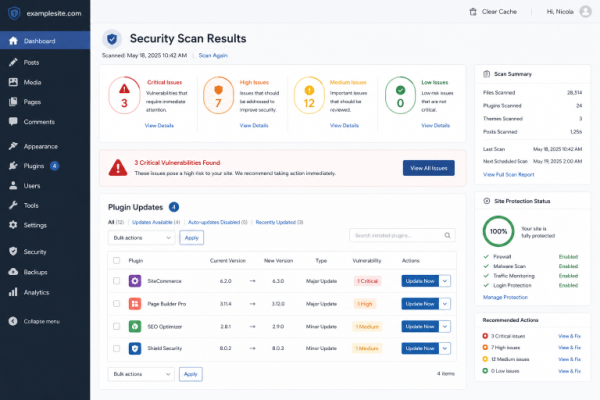
Before installing anything, do a quick search for the plugin name alongside terms like “vulnerability” or “CVE.” WPScan maintains a dedicated WordPress vulnerability database and is worth checking directly — many hosting security tools and plugins pull from it too. Wordfence also runs a free vulnerability database you can search by plugin name, and if you’re already using Jetpack, its Protect feature checks your installed plugins against known vulnerabilities automatically. More than 250 plugin vulnerabilities are disclosed every week — many of them exploitable without even needing to log in. A quick lookup takes two minutes and could prevent a serious breach.
Stick to Reputable Sources
Only download plugins from the official WordPress directory or directly from a trusted developer’s website. Third-party sites offering “free” premium plugins are a common vector for malicious code. If something looks too good to be true, it usually is.
Keep an Eye on What You’ve Already Installed
Vetting a plugin once isn’t a one-and-done job. New vulnerabilities emerge constantly, and a plugin that was perfectly safe six months ago might not be today. Make sure your plugins are always running the latest version, and use a tool that actively checks for known vulnerabilities rather than relying on manual lookups. Wordfence and Jetpack Protect both scan your installed plugins against their vulnerability databases and will flag a problem before it becomes an incident — set one up once and let it do the ongoing watching for you.
A Note on AI-Powered Plugins
More plugins are incorporating AI features in 2026, and while that can add genuine value, it also introduces new security considerations. AI integrations often involve external API connections and data handling that aren’t always transparent. Apply the same vetting process to these plugins, and check what data they’re sending and where.
The Bottom Line
Knowing how to vet WordPress plugins is one of the most practical things you can do to protect your website. The official directory is a useful starting point, but it’s not a safety guarantee. A few minutes of due diligence before each install – checking update history, ratings, support activity, and known vulnerabilities – goes a long way toward keeping your site secure and running smoothly.
If you’d like help auditing the plugins on your WordPress site or want to make sure your setup is as secure as it should be, feel free to get in touch.